Accessories · New Product
Two Tools in One: How the Wicked Edge Blade Stabilizer Works for CamLock and DualCam Vises
Most sharpening accessories do one thing. This one solves two of the most common sources of inconsistency in a single snap-in attachment—blade deflection and blade slip.
Every sharpening session has two moments where things can go wrong before a stone ever touches the blade. The first is when you clamp the knife—if it slips down in the vise, your clamping height changes and so does your effective angle. The second is during sharpening itself—if the blade flexes under stone pressure, the apex moves and the bevel becomes inconsistent. The Blade Stabilizer for CamLock and DualCam Vises addresses both problems with a single accessory, two independently operable components, and an installation that takes seconds.
Key Takeaways
- → The Blade Stabilizer is a two-in-one accessory: the Blade Stop prevents knives from slipping in the vise; the Blade Support eliminates flex in long, flexible blades during sharpening.
- → Installation requires no tools—two prongs snap directly onto the pins on the front face of any CamLock or DualCam Vise.
- → The Blade Stop is particularly valuable for blades under one inch from edge to spine, where consistent clamping height is otherwise difficult to achieve.
- → The Blade Support arm reaches blades up to 12 inches long. For longer blades, two units can be used simultaneously—one on each side of the vise.
- → Both functions are independent. Use one, the other, or both—depending on the knife in front of you.
- → Compatible with CamLock and DualCam Vises only. Not compatible with the Standard Vise.
Understanding the Two Functions
The Blade Stabilizer's two components solve two distinct problems. They can work together or independently, and understanding what each does—and when to reach for it—is the key to getting the most out of the accessory.

Function One
Blade Stop
A flip-up ledge that sits between the vise jaws, giving the spine a fixed reference point before clamping. Prevents blades from sliding down during setup and ensures consistent clamping height across sessions—especially valuable for shorter blades where small positional differences have an outsized effect on effective sharpening angle.
Function Two
Blade Support
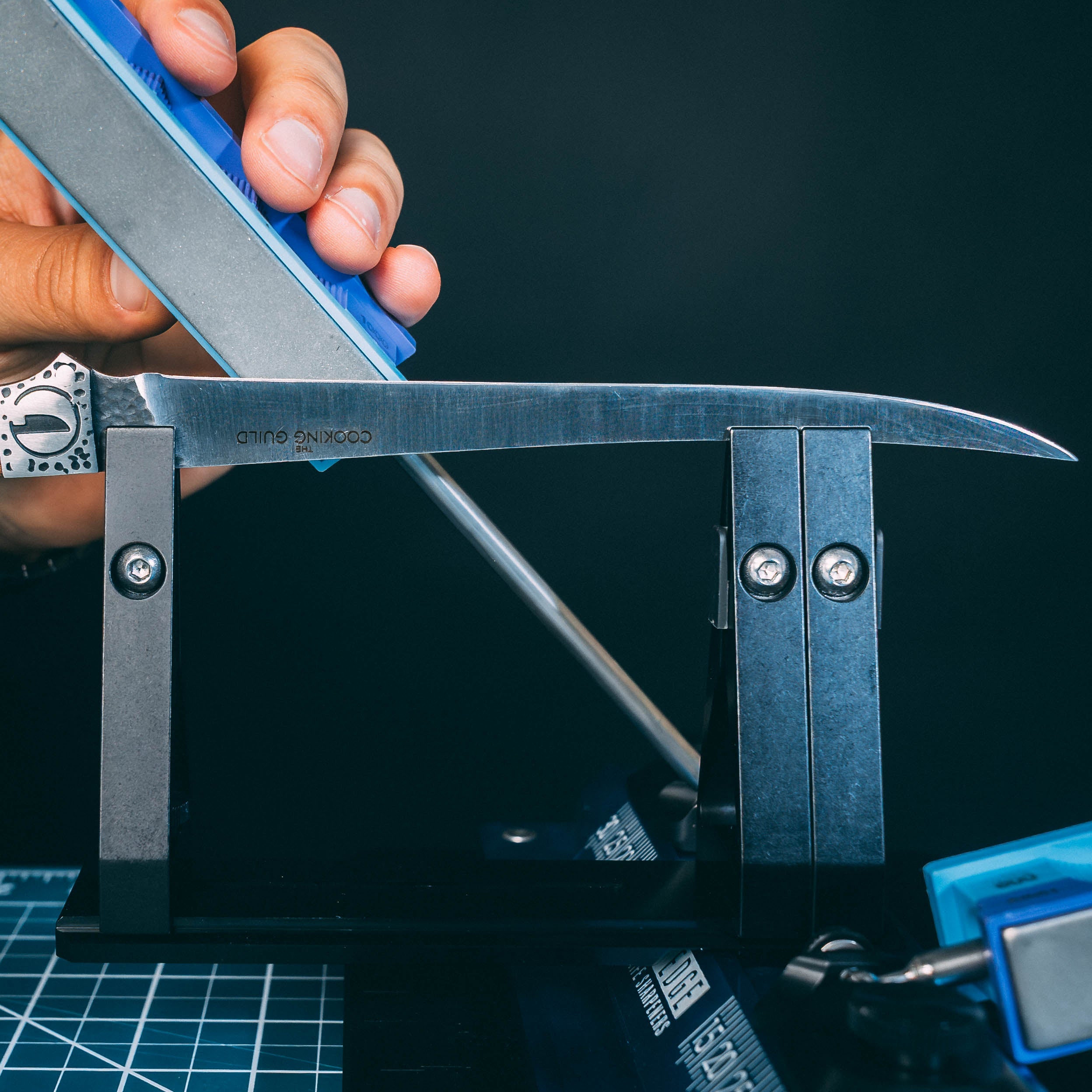
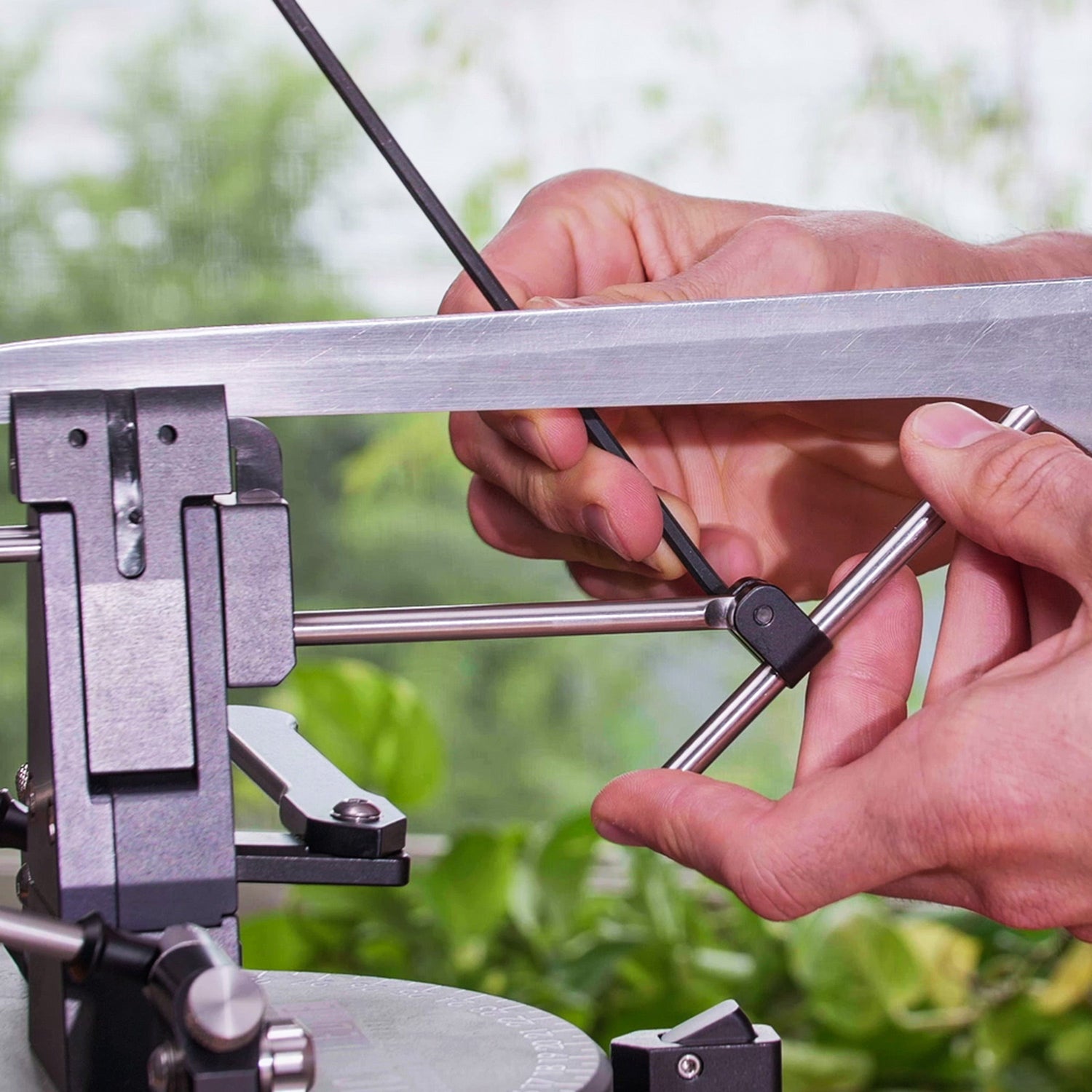
A pivoting arm with a V-notch tip that braces the spine of flexible blades at a second contact point. Tightening the pivot screw locks the arm against the spine, eliminating lateral deflection under stone pressure and producing consistent bevels on fillet knives, boning knives, long slicers, and any blade that flexes under sharpening load.
The Blade Stop: Consistent Clamping, Every Time
Wicked Edge sharpeners are calibrated with the edge of the knife resting 5/8 inch above the top of the vise. That measurement is the foundation of accurate angle readings on all Wicked Edge CamLock and DualCam machines. On full-size knives, hitting that position is intuitive. On shorter blades—anything under an inch from edge to spine—the margin for positional error shrinks considerably, and a few millimeters of clamping height variation can meaningfully shift your effective angle without the angle markings reflecting the change.
The Blade Stop eliminates that variable. Flip it up between the jaws, rest the spine of the knife on it, and close the vise normally. The blade is positioned at the same reference point every time, regardless of how the knife is held during clamping. For sharpeners who work through a range of blade sizes in a single session, or who return to the same knives repeatedly, that consistency compounds across every pass.
When you don't need the Blade Stop—for example, when working with larger knives where positional consistency is easier to achieve manually—the arm flips down and out of the way. It adds nothing to the profile of the setup and doesn't interfere with the Blade Support when both are in use.
The Blade Support: Eliminating Flex at the Source
A flexible blade is a precision sharpening problem in one specific way: the lateral pressure of a sharpening stone causes the blade to deflect, and deflection changes the effective angle at the apex mid-stroke. That change is small—but it's inconsistent, and inconsistency in bevel geometry is exactly what a precision system is designed to eliminate.
The Blade Support addresses this by adding a second clamping point along the spine, positioned as close to the handle as the blade geometry allows. The V-notch seats cleanly against the spine without requiring precise placement—it self-centers under light pressure as the pivot screw is tightened. Once locked, the blade is effectively rigid for the duration of the sharpening session. Stone pressure has nowhere to push it.
For blades longer than 12 inches—some dedicated fillet and salmon knives, certain slicers—a second Blade Stabilizer can be mounted on the opposite side of the vise. The two units together extend spine support well beyond what either could achieve alone, handling even the most demanding flexible blades with the same consistency as a rigid knife.
Installing and Using the Blade Stabilizer
Installation & Setup
Unlock the vise. Place the lever in the up (unlocked) position. The accessory must be installed with the vise open—attempting to snap it in while locked can misalign the prongs.
Align the prongs with the vise pins. Two prongs on the back of the Blade Stabilizer correspond to two pins on the front face of your CamLock or DualCam Vise. Line them up visually before applying pressure.
Snap into place. Push the Blade Stabilizer forward firmly until the prongs engage and the unit seats fully. You'll feel it click into position. No tools required.
Using the Blade Stop
Flip the Blade Support arm up and out of the way. This clears the jaw area for unobstructed clamping.
Flip the Blade Stop up between the jaws. It should sit level between the jaw faces, creating a ledge the spine of the knife can rest on.
Rest the spine on the Blade Stop and close the vise normally. The knife is now clamped at a consistent, repeatable height. Proceed with your standard sharpening routine.
Using the Blade Support
Clamp the blade in the main vise. Position the knife so the belly—the start of the curve—sits near the back of the vise, not centered or toward the heel. This gives the Blade Support arm maximum reach along the rear of the blade.
Assess flex. Apply light hand pressure to the blade. If it moves, the Blade Support will make a meaningful difference. Even minor deflection is worth addressing—what feels small by hand is amplified across repeated sharpening strokes.
Position the V-notch on the spine. Hold the Blade Support arm with one hand and place the V-notch against the spine as close to the handle as the geometry allows. The notch self-centers as you apply pressure.
Tighten the pivot screw. Use the included large Allen wrench to secure the arm. Snug is sufficient—enough to eliminate movement without marring the spine on thin-finished blades.
Verify and sharpen. The blade should feel completely rigid under hand pressure. Sharpen with your normal angle settings and light, consistent stone pressure—let the stones do the work.
Blade Stabilizer — CamLock/DualCam FAQ
What is the Wicked Edge Blade Stabilizer for CamLock and DualCam Vises?
It's a two-in-one accessory that attaches directly to the front of a CamLock or DualCam Vise. It includes two components: the Blade Stop, which prevents blades from slipping downward during clamping and ensures consistent clamping height, and the Blade Support, a pivoting arm with a V-notch that braces the spine of flexible blades to eliminate deflection during sharpening.

What is the Blade Stop and when should I use it?
The Blade Stop is a small flip-up ledge that sits between the vise jaws, giving the spine of your knife a fixed reference point to rest against before you tighten the vise. It's especially useful for shorter blades—under one inch from edge to spine—where consistent clamping height is otherwise hard to achieve. It can also be used on any blade where you want to ensure the knife doesn't shift position between sharpening sessions.
What is the Blade Support and how does it work?
The Blade Support is a pivoting arm with a V-notch at the tip that cradles the spine of a flexible blade. After clamping the knife in the main vise, you position the V-notch against the spine as close to the handle as possible, then tighten the pivot screw to lock it. With the spine supported at a second contact point, the blade cannot deflect laterally under stone pressure, producing consistent bevels even on extremely flexible blades.
Which Wicked Edge sharpeners are compatible with this Blade Stabilizer?
The Blade Stabilizer — CamLock/DualCam is compatible with all Wicked Edge sharpeners that use a CamLock or DualCam Vise. It is not compatible with the Standard Vise found on the GO-WE60 and certain other models. If your sharpener uses a Standard Vise, see the Blade Stabilizer — Standard Vise instead.
How long of a blade can the Blade Stabilizer support?
The Blade Support arm reaches blades up to 12 inches in length. For blades longer than 12 inches, two Blade Stabilizers can be used simultaneously—one on each side of the vise—to extend support further along the spine. The accessory can secure blades up to 3/16 inch thick.
Do I need to use both the Blade Stop and Blade Support at the same time?
No. The two functions are independent. The Blade Support can be flipped out of the way when you only need the Blade Stop, and the Blade Stop can remain in place while using the Blade Support. Use whichever function—or both—the knife in front of you requires.
How do I install the Blade Stabilizer on a CamLock or DualCam Vise?
Ensure your vise is in the unlocked position with the lever up. Align the two prongs on the Blade Stabilizer with the pins on the front face of the vise, then push forward firmly until the prongs engage and the accessory snaps into place. No tools are required for installation or removal. Two Allen wrenches are included for adjusting the pivot screw on the Blade Support arm.
The best sharpening accessories solve problems without creating new ones. The Blade Stabilizer for CamLock and DualCam Vises doesn't change your workflow—it removes two failure points from it. Blade slip disappears. Blade flex disappears. What remains is the sharpening itself, with the angle geometry doing exactly what it was designed to do.
For anyone who sharpens flexible blades regularly, the Blade Support alone justifies the accessory. For anyone who works across a range of knife sizes in a single session, the Blade Stop compounds that value considerably. Together, they address the two most common sources of inconsistency that happen before a stone ever touches the edge.
Two problems, one accessory, zero changes to the sharpening routine you've already dialed in.
If your Wicked Edge sharpener uses a Standard Vise, there's a purpose-built version for your system: the Blade Stabilizer — Standard Vise. It uses a rail-and-auxiliary-vise approach designed specifically for Standard Vise machines.